
After the first version of the track generator, we continued working to optimize the process. Following numerous phases of testing, adjustments, and improvements, we are very pleased to present the brand new version of the software.
Because this update fundamentally transforms the tool, we decided to give it a brand new name: Slot Track Autogen!
What is Slot Track Autogen?
Slot Track Autogen allows you to automatically generate closed track layouts from the track pieces you have available. This new version adopts a unique calculation method and offers a completely redesigned interface for a much smoother user experience.
Link : https://www.carrera-fun.com/track_architect/slottrack_autogen.php
It allows the generation of circuits for the following ranges:
- FIRST
- GO
- D132
- HYBRID
Under the hood: a technical optimization challenge
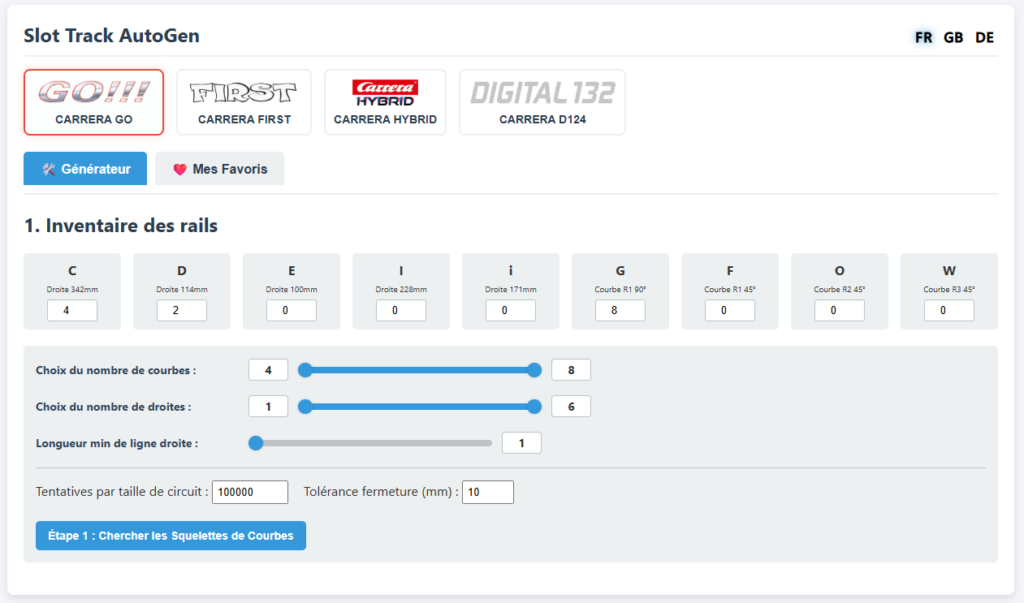
There are several difficulties:
- The more different types of track there are, the more the number of possible combinations increases considerably.
- The more track of each type there is, the more possibilities there are as well.
All of this is exponential, and therefore requires considerable processing power to generate results.
A significant amount of optimization was necessary to obtain results quickly.
To generate results in seconds without crashing the servers, we redesigned our architecture: calculations are now performed directly by your computer (via your web browser). This allows you to leverage the power of your own machine to generate graphs extremely fast!
Except for the Hybrid range, where we specify a number of curves, and each curve can be used for a right or left turn, further increasing the possibilities.
By default, Slot Track AutoGen searches for tracks with a minimum to a maximum number of rails, but you can force a search range and even specify the minimum straightaway length in terms of the number of rails.

Slot Track Autogen is designed to generate closed circuits. However, we allow a small margin, set by default to 10mm in X and 10mm in Y, to compensate for occasional calculation inaccuracies of a few tenths of a millimeter. For circuits several meters long, the track flexibility allows for closing and compensating for small discrepancies. You can, of course, adjust this tolerance.
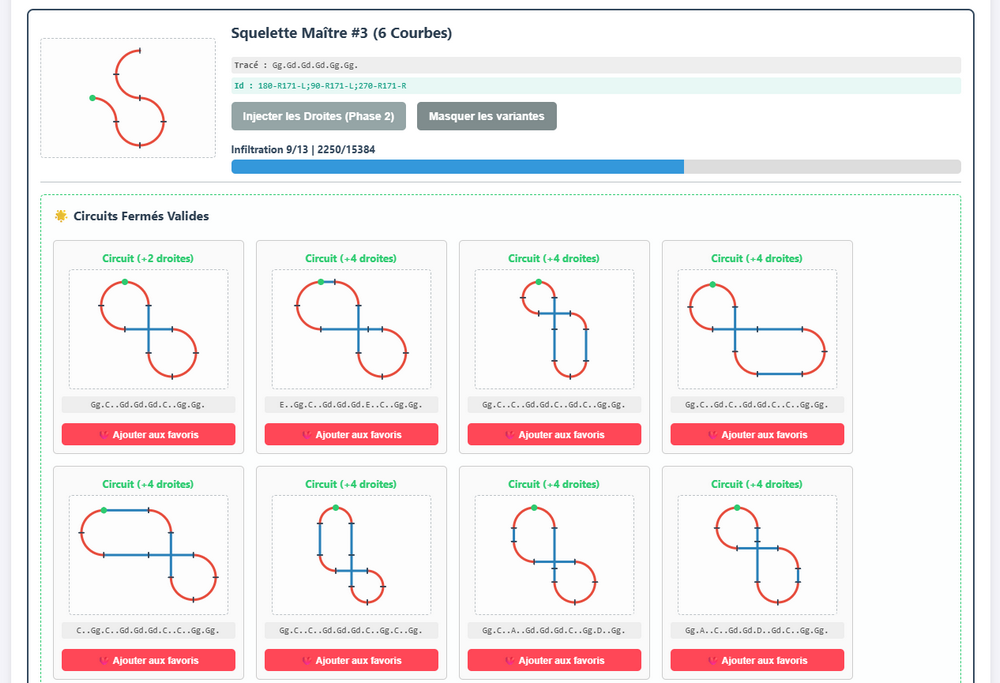
In two stages
The program first searches for curve sequences so that the beginning of the first curve is in the same direction as the end of the last curve.
It does this by increasing the number of curves used from 4 to X, depending on the number you specify.
Then, if you see a curve sequence you like, you can click “Inject Straights,” and Slot Track Autogen will insert straight lines from 1 to X, depending on the number you specified, to create a closed circuit that meets the specified tolerances.
Manage your creations with ease
It’s not uncommon to find yourself with dozens, or even hundreds, of suggestions! To help you find your way around easily:
- Favorites System: Save your favorite tracks to easily access them anytime in the Favorites tab.
- Star Rating: Rate your tracks from 0 to 5 stars to distinguish between your favorites and lesser-known gems.
- Advanced Editing: With a single click, open any creation directly in Slot Track Architect to view it in detail, adjust it, or customize it manually.
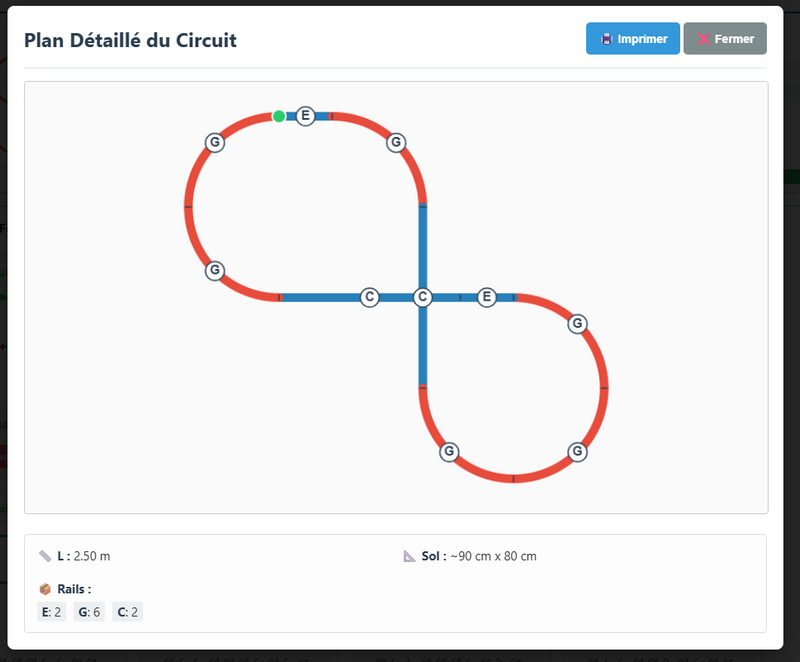
More information on the dedicated page : AutoGen
Link : https://www.carrera-fun.com/track_architect/slottrack_autogen.php
FAQ :
Why aren’t all the track sections available, like the FIRST chicane for example?
This track is simply a straight line, so it should be treated as such. After generation, you can place your chicane wherever you want on a straight line. There’s no added value in including this track in the constraints except to increase the number of possible results and the calculation time.
Why isn’t there a starting track section?
This track is simply a straight line, so it should be treated as such. After generation, you can place your straight line wherever you want.
Why aren’t there any banked curves?
To avoid further increasing the number of results, it’s simpler to have only one type of curve for a given radius and angle, and for you to select which curves to bank on a track.
Why does AutoGen sometimes fail to find a track from the skeleton?
It’s possible there aren’t enough straight lines available to close the circuit. Add more straight lines and try again.
I hope you will be able to create original circuits that you will enjoy driving on.